Concurrency and synchronization in go
Hello! I'm Vlad and today I want to explore the topic of concurrency in Go and try to practically examine different goroutine synchronization primitives.
Developing multithreaded programs has always been a challenging task that requires a deep understanding of synchronization mechanisms. As for Go, it provides developers with a powerful set of tools for working with concurrency. Synchronization primitives in Go are key components for creating reliable and efficient concurrent programs.
In this article, we'll look at the main synchronization primitives that Go offers and their practical applications. Understanding these tools is critical for every Gopher as they help avoid typical concurrent programming problems and write more reliable code.
Concurrency in Go
Concurrency and parallelism are two different concepts that are often confused.
Concurrency
Concurrency is the ability of a program to handle multiple tasks simultaneously, regardless of whether they are executed in parallel or not. In Go, this is achieved through
goroutines- lightweight execution threads (from 2KB) managed by theGo Scheduler.
To explain it briefly and simply - the Go scheduler very quickly (seemingly almost simultaneously) switches contexts between goroutines, ensuring their concurrent execution.
Main characteristics of concurrency in Go:
- Goroutines can execute independently of each other
- The Go scheduler decides when and how to allocate resources between goroutines
Parallelism
Parallelism is the simultaneous execution of multiple tasks on different processors or cores. It's a subset of concurrency that is only possible on systems with multiple processors.
Key differences:
- Parallelism requires multiple processors or cores
- Parallelism is about simultaneous execution
- Not all concurrent programs are necessarily parallel
As Rob Pike said:
Concurrency is about dealing with lots of things at once.
Parallelism is about doing lots of things at once.
I don't see much point in diving too deep into this topic in this article, as we're interested in a different question - how can we synchronize goroutines?
Environment Variables Related to Concurrency
Go provides several important environment variables that are related to and affect the operation of concurrent programs:
GOMAXPROCS- determines the maximum number of processors (P) that can execute Go code simultaneously.- By default equals the number of logical processors in the system
- Can be changed programmatically through
runtime.GOMAXPROCS(n)
GOGC- controls the frequency of garbage collector runs- By default
GOGC=100, which means GC runs when memory usage doubles - Setting to
offcompletely disables GC (not recommended)
- By default
GOTRACEBACK- controls the detail level ofstack traceduring panic- Values:
none,single,all,system,crash - Useful for debugging concurrent programs
- Values:
GORACE- configuration forrace detector- Helps detect
race conditionsin concurrent code - Example:
GORACE="log_path=/path/to/log"
- Helps detect
Goroutine Synchronization Primitives
Synchronization primitives are tools that help control access to shared resources and coordinate work between goroutines.
Let's examine each of them in detail with examples.
Mutexes
Mutex (mutual exclusion) is a synchronization primitive that represents a locking mechanism allowing goroutines to safely access shared resources.
It is implemented in the standard sync package and is the simplest way to protect data from concurrent access. The principle of mutex operation is quite simple and straightforward:
- A goroutine that wants to access a shared resource calls
Lock() - If the mutex is already locked by another goroutine, the current goroutine blocks and waits
- When the resource is released through
Unlock(), one of the waiting goroutines gets access to the resource
Mutex is particularly useful in cases where you need to protect critical sections of code from simultaneous execution by different goroutines. It ensures that only one goroutine can access a shared resource at any given time.
The sync package implements 2 types of mutexes:
Mutex- locks on every operation, regardless of whether it's reading or writing.- To put it in simpler terms, this type of mutex completely blocks data access for all other goroutines until the first goroutine completes its work. It's like a lock on a door - when one person enters a room and locks the door, no one else can enter or even see what's happening inside until the first person leaves and unlocks the door.
RWMutex- locks only during data writing, while reading can occur simultaneously by many goroutines.- To put it in simpler terms, this type of mutex allows many people to read a book simultaneously, but only one person can edit it.
- It's like in a library - many visitors can read books simultaneously, but the librarian can update the catalog only when no one is reading.
Let's look at several examples of using these mutexes:
Mutex
package main

import (
    "fmt"
    "sync"
    "time"
)

type Config struct {
    mu   sync.Mutex
    data map[string]any
}

func (c *Config) Set(key string, value any) {
    c.mu.Lock()
    // Unlock after function exit
    defer c.mu.Unlock()
    c.data[key] = value
}

func (c *Config) Get(key string) (any, bool) {
    c.mu.Lock()
    // Unlock after function exit
    defer c.mu.Unlock()
    val, ok := c.data[key]
    return val, ok
}

func main() {
    cfg := &Config{
        data: make(map[string]any),
    }

    // safe access from different goroutines
    go cfg.Set("host", "localhost")
    go cfg.Set("port", 8080)

    time.Sleep(time.Millisecond)
    if val, ok := cfg.Get("port"); ok {
        fmt.Printf("Port: %v\n", val)
    }
}
In this example, we create a simple configuration structure that uses a mutex to protect access to its internal map. The Set and Get methods use Lock() and Unlock() to ensure that only one goroutine can modify or read the map at a time.
Notice the use of defer mu.Unlock() which ensures that the mutex is always unlocked when the function returns, even if a panic occurs. This is a common pattern in Go to prevent deadlocks.
RWMutex
package main

import (
    "fmt"
    "sync"
    "time"
)

type Config struct {
    mu   sync.RWMutex
    data map[string]any
}

func (c *Config) Set(key string, value any) {
    c.mu.Lock()
    defer c.mu.Unlock()
    c.data[key] = value
}

func (c *Config) Get(key string) (any, bool) {
    c.mu.RLock()
    defer c.mu.RUnlock()
    val, ok := c.data[key]
    return val, ok
}

func main() {
    cfg := &Config{
        data: make(map[string]any),
    }

    // write data
    go cfg.Set("host", "localhost")
    go cfg.Set("port", 8080)

    // concurrent reading from different goroutines
    for i := 0; i < 3; i++ {
        go func(id int) {
            if val, ok := cfg.Get("port"); ok {
                fmt.Printf("Reader %d got port: %v\n", id, val)
            }
        }(i)
    }

    time.Sleep(time.Millisecond)
}
In this example, we use RWMutex, which allows multiple goroutines to read data simultaneously (using RLock/RUnlock), while write operations remain mutually exclusive (using Lock/Unlock). This significantly improves performance in cases where read operations occur more frequently than write operations.
Waiting for a Group of Goroutines (WaitGroup)
WaitGroup is a synchronization primitive in Go that allows a goroutine to wait for the completion of a group of other goroutines.
It's like an "active task counter" that helps coordinate work between goroutines.
WaitGroup has three main methods:
Add(delta int)- increases the goroutine counter by the specified number. Called before launching new goroutinesDone()- decreases the counter by 1. Usually called viadeferinside a goroutineWait()- blocks execution until the counter becomes 0
Think of it as a group of workers, where:
Add()- is like assigning tasks to workersDone()- is like a worker reporting task completionWait()- is like a manager waiting until all workers finish their tasks
Let's look at an example where we want to launch 3 workers (functions that perform certain work) concurrently:
package main

import (
    "fmt"
    "sync"
    "time"
)

func main() {
    // initialize WaitGroup
    var wg sync.WaitGroup
    // mark execution start time
    start := time.Now()

    for i := 0; i < 3; i++ { // loop to launch workers
        // add new goroutine to the group in the loop
        wg.Add(1)
        go func(id int) {
            // good practice as defer is called after function exit
            // ensures the goroutine in the group will be marked as completed
            // regardless of possible cases and errors
            defer wg.Done()

            // simulate work time
            time.Sleep(1 * time.Second)
            fmt.Printf("Worker %d finished\n", id)
        }(i)
    }

    // wait until the number of goroutines in the group becomes 0
    wg.Wait()
    fmt.Printf("All workers completed in %s\n", time.Now().Sub(start))
}
In this example:
- We create a
WaitGroupto track our worker goroutines - Each worker is launched in a separate goroutine with
wg.Add(1)before launch - Workers use
defer wg.Done()to signal completion - The main goroutine waits for all workers using
wg.Wait()
The output will show each worker finishing and the total execution time, which will be approximately 1 second since all workers run concurrently.
Worker 0 finished
Worker 2 finished
Worker 1 finished
All workers completed in 1.015099904s
It's also worth noting that the execution order of goroutines in a WaitGroup is not guaranteed, as with any (well, almost any) concurrent code.
Channels
Channels in Go are a powerful mechanism for communication between goroutines that implements the CSP (Communicating Sequential Processes) principle. Channels allow goroutines to safely exchange data and synchronize their work.
I think that basic information about channels can always be found on the official golang website. But I want to bring some clarity for those who don't know or understand yet - why buffered and unbuffered channels exist and why they were designed this way.
If we look under the hood of Go itself, here's what we'll see:
// package runtime in go src
type hchan struct {
    qcount   uint           // total data in the queue
    dataqsiz uint           // size of the circular queue
    buf      unsafe.Pointer // points to an array of dataqsiz elements
    elemsize uint16
    closed   uint32
    timer    *timer         // timer feeding this chan
    elemtype *_type         // element type
    sendx    uint           // send index
    recvx    uint           // receive index
    recvq    waitq          // list of recv waiters
    sendq    waitq          // list of send waiters

    // lock protects all fields in hchan, as well as several
    // fields in sudogs blocked on this channel.
    //
    // Do not change another G's status while holding this lock
    // (in particular, do not ready a G), as this can deadlock
    // with stack shrinking.
    lock mutex
}
This is the internal structure of a channel in Go. Let's break down the key components:
qcountanddataqsiz- track the current number of elements and the size of the circular queue (buffer)buf- points to the actual buffer where data is storedsendxandrecvx- indices for sending and receiving operationssendqandrecvq- queues of goroutines waiting to send or receivelock- mutex to protect the channel's internal state
It's important to understand how channels work in cases when data is being written to and read from them. So, when data is written to a channel, this is what happens:
- If there's a goroutine in the
recvqqueue, the data is transferred directly to it - If the channel is buffered and there's space in the buffer, the data is added to the buffer
- Otherwise, the goroutine is blocked and added to the
sendqqueue
When a goroutine tries to receive data from a channel:
- If there's data in the buffer, it gets removed
- If there's a goroutine in
sendq, the data is received directly from it - Otherwise, the goroutine is blocked and added to
recvq
This implementation ensures efficient and safe data transfer between goroutines, guaranteeing FIFO (First-In-First-Out) processing order.
Unbuffered Channels
Unbuffered channels (also known as synchronous) have no internal buffer. This means that sending data to such a channel blocks until another goroutine is ready to receive this data.
Here's an example:
package main

import (
	"fmt"
	"time"
)

func main() {
	// creating an unbuffered channel
	ch := make(chan int)

	fmt.Println("send value")
	ch <- 42 // blocks until someone reads

	time.Sleep(1 * time.Second)
	fmt.Println("finished")
}
What will this program output? Below, of course, will be the solution and explanation, but try to guess for yourself first.
Solution and explanation
Actually, it's quite simple: we created an unbuffered channel, which means it blocks both during writing and reading. The main function is essentially also a goroutine that remains blocked during program execution, and since we already know that under the hood, unbuffered channels have only one slot for data, meaning when someone writes to an unbuffered channel, it remains blocked until someone reads from it.
As a result, all our goroutines are blocked. This is called a deadlock. This can be avoided by simply reading the value from the channel:
package main

import (
	"fmt"
)

func main() {
	// create unbuffered channel
	ch := make(chan int)

	go func() {
		fmt.Println("send value")
		ch <- 42 // blocks before someone reads
	}()

	<-ch // read from channel
	fmt.Println("got value")
}
Buffered Channels
Buffered channels have an internal buffer of specified size. Sending data only blocks when the buffer is full, and reading blocks when the buffer is empty.
package main

import "fmt"

func main() {
    // creating a buffered channel of size 2
    ch := make(chan int, 2)

    ch <- 1 // doesn't block
    ch <- 2 // doesn't block
    // ch <- 3 // would block because buffer is full

    fmt.Println(<-ch) // 1
    fmt.Println(<-ch) // 2
}
Main Channel Patterns
In principle, there are certainly more patterns, but I want to focus in detail on 3 of them.
- Fan-Out (work distribution) - pattern where one input data stream is distributed among multiple workers
- Fan-In (result collection) - pattern where results from many workers are collected into one output channel
- Pipeline - pattern of sequential data processing through a chain of channels
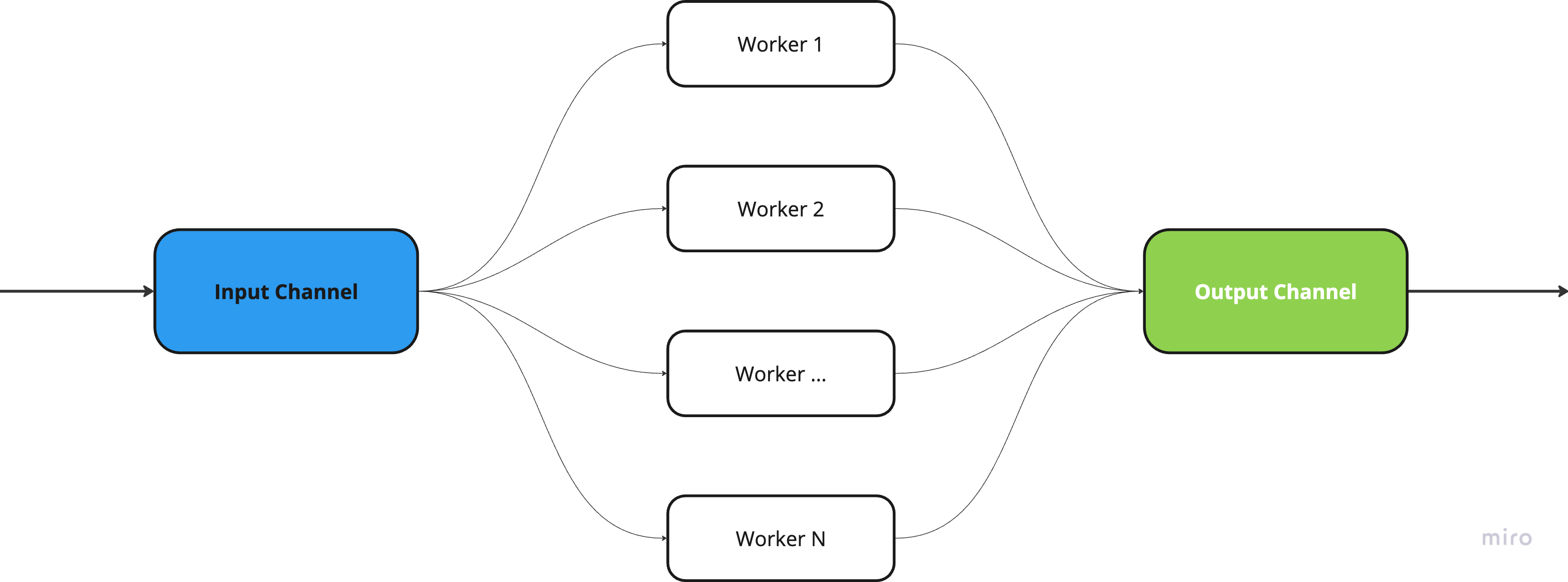
Fan-Out & Fan-In patterns
As we can see from the diagram, these 2 patterns in combination represent a good implementation of concurrent computations. Also, I have prepared an example implementation of these patterns in Go:
package main

import (
    "fmt"
    "sync"
    "time"
)

func fanOut(input <-chan int, workers int) []<-chan int {
    outputs := make([]<-chan int, workers)

    for i := 0; i < workers; i++ {
        ch := make(chan int)
        outputs[i] = ch

        go func(ch chan int) {
            defer close(ch)

            for val := range input {
                ch <- val * 2 // simulate data processing
            }
        }(ch)
    }

    return outputs
}

func fanIn(inputs ...<-chan int) <-chan int {
    output := make(chan int)
    var wg sync.WaitGroup

    // launch goroutine for each input channel
    for _, ch := range inputs {
        wg.Add(1)
        go func(c <-chan int) {
            defer wg.Done()
            for val := range c {
                output <- val
            }
        }(ch)
    }

    // close output channel after all goroutines complete
    go func() {
        wg.Wait()
        close(output)
    }()

    return output
}

func main() {
    start := time.Now()

    // initialize input unbuffered channel with data
    input := make(chan int)
    go func() {
        for i := 1; i <= 10; i++ {
            input <- i
        }
        close(input)
    }()

    // distribute work between 3 workers
    workers := fanOut(input, 3)

    // collect results into a single channel
    results := fanIn(workers...)

    // output results
    for result := range results {
        fmt.Println(result)
    }

    fmt.Println("Program finished in", time.Now().Sub(start))
}
Let's understand what's happening here:
- First, an input channel is created with numbers from 1 to 10
- The
fanOutfunction distributes these numbers between three workers, each of which multiplies the received number by 2 - The
fanInfunction collects results from all workers into one output channel - At the end, we output all processed numbers and the program execution time
This approach allows for efficient concurrent data processing because:
- Each worker operates independently in a separate goroutine
- The use of channels ensures safe data transfer between goroutines
Now let's look at an example implementation of the Pipeline pattern.
Pipeline - a pattern of sequential data processing through a chain of channels:
package main

import "fmt"

func generator() <-chan int {
    out := make(chan int)

    go func() {
        defer close(out)
        for i := 0; i < 5; i++ {
            out <- i
        }
    }()

    return out
}

func multiply(in <-chan int) <-chan int {
    out := make(chan int)

    go func() {
        defer close(out)
        for val := range in {
            out <- val * 2
        }
    }()

    return out
}

func addOne(in <-chan int) <-chan int {
    out := make(chan int)

    go func() {
        defer close(out)
        for val := range in {
            out <- val + 1
        }
    }()

    return out
}

func pipeline() {
    // generate numbers from 0 to 5 (exclusive)
    numbers := generator()
    // multiply each number by 2
    doubled := multiply(numbers)
    // add 1 to each number
    result := addOne(doubled)

    // output results
    for val := range result {
        fmt.Println(val)
    }
}

func main() {
    // start pipeline
    pipeline()
}
When working with channels, it's important to remember several key rules:
- Writing to a closed channel will cause a
panic - Reading from a closed channel returns the zero value of the type
- Closing a channel should be done by the sender, not the receiver
- Use
selectwhen working with multiple channels
Select is a powerful construct in Go that allows a goroutine to wait for operations on multiple channels simultaneously. It is a key tool for coordinating and synchronizing goroutines.
Main features of select:
- Can work with multiple channels simultaneously
- Blocks execution until at least one channel is ready for operation
- If multiple channels are ready - chooses a random one
- Can have a
defaultcase for non-blocking operations
Let's look at a basic example of using select:
func main() {
    ch1 := make(chan string)
    ch2 := make(chan string)

    go func() {
        time.Sleep(2 * time.Second)
        ch1 <- "message from first channel"
    }()

    go func() {
        time.Sleep(1 * time.Second)
        ch2 <- "message from second channel"
    }()

    for i := 0; i < 2; i++ {
        select {
        case msg1 := <-ch1:
            fmt.Println(msg1)
        case msg2 := <-ch2:
            fmt.Println(msg2)
        }
    }
}
Example of non-blocking select with default:
select {
case data := <-ch:
    fmt.Println("got:", data)
case ch <- "data":
    fmt.Println("sent")
default:
    fmt.Println("non-blocking operation")
}
select is commonly used to implement timeouts:
select {
case result := <-ch:
    fmt.Println("got:", result)
case <-time.After(2 * time.Second):
    fmt.Println("timeout")
}
Also, select is useful for graceful shutdown of goroutines:
package main

import (
	"fmt"
	"time"
)

func worker(done chan bool) {
	for {
		select {
		case <-done:
			fmt.Println("finishing work")
			return
		default:
			fmt.Println("doing work...")
			time.Sleep(time.Second)
		}
	}
}

func main() {
	done := make(chan bool)
	go worker(done)

	time.Sleep(3 * time.Second)
	done <- true // signal to finish
	time.Sleep(time.Second)

	close(done)
}
select is an indispensable tool when developing concurrent programs in Go, especially when you need to:
- Handle multiple channels simultaneously
- Implement operation timeouts
- Organize non-blocking operations with channels
- Manage goroutine lifecycles
Once and Cond
Once ensures that code will be executed only once. A perfect example of the singleton design pattern:
package main

import (
    "fmt"
    "sync"
)

type singleton struct{}

var (
    instance *singleton
    once     sync.Once
)

func getInstance() *singleton {
    once.Do(func() {
        instance = &singleton{}
    })
    return instance
}

func main() {
    // get singleton instance twice
    s1 := getInstance()
    s2 := getInstance()

    // check that this is the same instance
    fmt.Printf("s1: %p\n", s1)
    fmt.Printf("s2: %p\n", s2)
    fmt.Printf("addresses s1 & s2 equals: %v\n", s1 == s2)
}
Cond is used for waiting for a certain condition:
package main

import (
    "fmt"
    "sync"
)

func main() {
    var (
        condition = sync.NewCond(&sync.Mutex{})
        ready     = false
    )

    go func() {
        time.Sleep(time.Second) // imitate work
        condition.L.Lock()
        ready = true
        condition.Signal()
        condition.L.Unlock()
    }()

    condition.L.Lock()
    for !ready {
        condition.Wait()
    }
    condition.L.Unlock()
    fmt.Println("Ready!")
}
Atomic Operations sync/atomic
Atomic operations are operations that are executed as a single unit, without the possibility of interruption by other goroutines.
Go has a standard package sync/atomic for working with atomic operations. It's important to understand the difference between a mutex (MX) and an atomic operation (AO):
AOswork at the processor level, while MX works at the operating system levelAOsare faster than MX since they don't require locking!AOsare suitable for simple operations (increment, decrement, value replacement, etc.), whileMXis for complex critical sections
Let's compare the performance of atomic operations and mutexes in practice:
package main

import (
    "fmt"
    "sync"
    "sync/atomic"
    "testing"
)

// structure with AO
type atomicCounter struct {
    counter atomic.Int64
}

func (c *atomicCounter) increment() {
    c.counter.Add(1)
}

func (c *atomicCounter) getValue() int64 {
    return c.counter.Load()
}

// structure with MX
type mutexCounter struct {
    mu      sync.Mutex
    counter int64
}

func (c *mutexCounter) increment() {
    c.mu.Lock()
    c.counter++
    c.mu.Unlock()
}

func (c *mutexCounter) getValue() int64 {
    c.mu.Lock()
    defer c.mu.Unlock()
    return c.counter
}

func BenchmarkAtomic(b *testing.B) {
    counter := &atomicCounter{}
    b.RunParallel(func(pb *testing.PB) {
        for pb.Next() {
            counter.increment()
        }
    })
}

func BenchmarkMutex(b *testing.B) {
    counter := &mutexCounter{}
    b.RunParallel(func(pb *testing.PB) {
        for pb.Next() {
            counter.increment()
        }
    })
}

func main() {
    // testing with 1 million iterations
    iterations := 1000000
    var wg sync.WaitGroup

    // test atomic counter
    atomicStart := testing.Benchmark(BenchmarkAtomic)
    fmt.Printf("Atomic operations: %d ns/op\n", atomicStart.NsPerOp())

    // test mutex
    mutexStart := testing.Benchmark(BenchmarkMutex)
    fmt.Printf("Mutex operations: %d ns/op\n", mutexStart.NsPerOp())

    ac := &atomicCounter{}
    mc := &mutexCounter{}

    for i := 0; i < iterations; i++ {
        wg.Add(2)
        go func() {
            defer wg.Done()
            ac.increment()
        }()
        go func() {
            defer wg.Done()
            mc.increment()
        }()
    }

    wg.Wait()

    fmt.Printf("Atomic counter final value: %d\n", ac.getValue())
    fmt.Printf("Mutex counter final value: %d\n", mc.getValue())
}Output:
Atomic operations: 7 ns/op
Mutex operations: 25 ns/opAs we can see, AO needs an average of 7 nanoseconds per operation, while MX needs 25 nanoseconds per operation. The difference is 3 times, but we shouldn't forget that results may vary somewhat depending on processor architecture and load.
Let's look at an example of using atomic.Pointer[T]:
package main

import (
    "fmt"
    "sync"
    "sync/atomic"
)

// structure for storing data
type Config struct {
    MaxConnections int
    Timeout       int
}

func main() {
    // create atomic pointer to Config
    var cfg atomic.Pointer[Config]

    // init configuration
    initialConfig := &Config{
        MaxConnections: 100,
        Timeout:       30,
    }
    cfg.Store(initialConfig)

    var wg sync.WaitGroup

    // read configuration
    wg.Add(1)
    go func() {
        defer wg.Done()
        // atomically read current configuration
        config := cfg.Load()
        fmt.Printf("Reader: MaxConnections=%d, Timeout=%d\n",
            config.MaxConnections,
            config.Timeout)
    }()

    // update configuration
    wg.Add(1)
    go func() {
        defer wg.Done()
        // create new configuration
        newConfig := &Config{
            MaxConnections: 200,
            Timeout:       45,
        }
        // atomically update configuration
        cfg.Store(newConfig)
        fmt.Println("Writer: Configuration updated")
    }()

    wg.Wait()

    // check final state
    finalConfig := cfg.Load()
    fmt.Printf("Final config: MaxConnections=%d, Timeout=%d\n",
        finalConfig.MaxConnections,
        finalConfig.Timeout)
}
In this example, we use atomic.Pointer[T] for safe access to the structure from different goroutines. This ensures that reading and writing the structure happens atomically, without race conditions.
Why map+mutex is better than sync.Map in many cases
In the sync package, Go developers have provided us with another primitive which, it would seem, could be implemented simply with map+mutex, but for some reason this variant exists too. Let's dig a little deeper:
Let's continue our exploration of synchronization primitives in Go. Today I want to tell you about sync.Map - a thread-safe map implementation that has two main advantages:
- When we have immutable keys that are written once but read many times (for example, for caching)
- When different goroutines work with different keys in parallel
Let's look at a simple usage example:
package main

import (
    "fmt"
    "sync"
)

func main() {
    var m sync.Map

    // write values
    m.Store("key1", "value1")
    m.Store("key2", "value2")

    // read values
    value, ok := m.Load("key1")
    if ok {
        fmt.Printf("Value: %v\n", value)
    }

    // LoadOrStore will return existing value or store new one
    actual, loaded := m.LoadOrStore("key1", "new value")
    fmt.Printf("Value: %v, already existed: %v\n", actual, loaded)

    // loop through all elements
    m.Range(func(key, value interface{}) bool {
        fmt.Printf("Key: %v, Value: %v\n", key, value)
        return true
    })

    // delete value
    m.Delete("key1")
}
Let's run some benchmarks?
package main

import (
    "fmt"
    "sync"
    "testing"
)

type MutexMap struct {
    sync.RWMutex
    m map[int]int
}

func BenchmarkMutexMap(b *testing.B) {
    mm := &MutexMap{m: make(map[int]int)}
    b.RunParallel(func(pb *testing.PB) {
        i := 0
        for pb.Next() {
            if i%2 == 0 {
                mm.Lock()
                mm.m[i] = i
                mm.Unlock()
            } else {
                mm.RLock()
                _ = mm.m[i]
                mm.RUnlock()
            }
            i++
        }
    })
}

func BenchmarkSyncMap(b *testing.B) {
    var sm sync.Map
    b.RunParallel(func(pb *testing.PB) {
        i := 0
        for pb.Next() {
            if i%2 == 0 {
                sm.Store(i, i)
            } else {
                sm.Load(i)
            }
            i++
        }
    })
}

func main() {
    mutexResult := testing.Benchmark(BenchmarkMutexMap)
    syncMapResult := testing.Benchmark(BenchmarkSyncMap)

    fmt.Printf("MutexMap: %d ns/op\n", mutexResult.NsPerOp())
    fmt.Printf("SyncMap: %d ns/op\n", syncMapResult.NsPerOp())
}Output:
MutexMap: 228 ns/op
SyncMap: 1018 ns/opLet's summarize the main advantages of sync.Map:
- Built-in thread safety - no need to think about additional synchronization
- Optimized specifically for parallel access
- Convenient API for working with data
But there are several points to keep in mind:
- For single-threaded operations, regular
map+mutexwill be faster - No built-in support for
len()to get the map size - Need to work with
any (interface{})and perform type assertions
Efficient Object Reuse with sync.Pool
Another useful synchronization primitive in Go is sync.Pool. It allows storing and reusing temporary objects, which helps reduce the load on the GC (Garbage Collector).
Let's break down how sync.Pool works internally in simple terms:
- Each processor (
P) has local pools - Each processor (
P) in Go has its own local object pool. This is designed to reduce contention between goroutines - when a goroutine requests an object, it first checks the local pool of itsP - Private and shared caches:
- Private cache - accessible only to the current goroutine
- Shared cache - accessible to all goroutines on this
P
- How object
Getworks:- First checks the private cache
- If empty - checks the shared cache
- If that's empty too - checks pools of other
P - If no objects are found anywhere - calls the
New()function
- How object
Putworks:- Object first tries to enter the private cache
- If private cache is full - object goes to shared cache
- If shared cache is also full - object may be transferred to pools of other
Ps
- Pool cleanup
During each GC pass, all objects in pools (except those in private caches) can be collected. This prevents excessive object accumulation, but also means you can't rely on objects being permanently available in the pool.
This architecture is very efficient for cases where many goroutines frequently create and delete objects of the same type, while minimizing contention between goroutines for access to shared resources.
I would highlight these main advantages of using sync.Pool:
- Reduced
GCload through object reuse - Thread-safe object acquisition and return
- Automatic pool cleanup during garbage collection
Let's look at a real test from the sync/pool_test.go package regarding sync.Pool operation:
// Copyright 2013 The Go Authors. All rights reserved.
// Use of this source code is governed by a BSD-style
// license that can be found in the LICENSE file.

// Pool is no-op under race detector, so all these tests do not work.
//
//go:build !race

package sync_test

import (
	"runtime"
	"runtime/debug"
	"slices"
	. "sync"
	"sync/atomic"
	"testing"
	"time"
)

func TestPool(t *testing.T) {
	// disable GC so we can control when it happens.
	defer debug.SetGCPercent(debug.SetGCPercent(-1))
	var p Pool
	if p.Get() != nil {
		t.Fatal("expected empty")
	}

	// Make sure that the goroutine doesn't migrate to another P
	// between Put and Get calls.
	Runtime_procPin()
	p.Put("a")
	p.Put("b")
	if g := p.Get(); g != "a" {
		t.Fatalf("got %#v; want a", g)
	}
	if g := p.Get(); g != "b" {
		t.Fatalf("got %#v; want b", g)
	}
	if g := p.Get(); g != nil {
		t.Fatalf("got %#v; want nil", g)
	}
	Runtime_procUnpin()

	// Put in a large number of objects so they spill into
	// stealable space.
	for i := 0; i < 100; i++ {
		p.Put("c")
	}
	// After one GC, the victim cache should keep them alive.
	runtime.GC()
	if g := p.Get(); g != "c" {
		t.Fatalf("got %#v; want c after GC", g)
	}
	// A second GC should drop the victim cache.
	runtime.GC()
	if g := p.Get(); g != nil {
		t.Fatalf("got %#v; want nil after second GC", g)
	}
}
Conclusion
In this article, we've examined in detail what concurrency in Go is and the main synchronization primitives that help create efficient concurrent programs. I hope you're convinced that Go provides powerful tools for working with concurrency, such as sync.Map and sync.Pool, each with its own characteristics and use cases. It is important to understand that choosing the right synchronization primitive depends on the specific use case - where sync.Map might be slower than a regular map+mutex in a single-threaded environment, it can significantly improve performance with parallel access. Similarly, sync.Pool becomes an indispensable tool for optimizing memory usage and reducing garbage collector load in cases of frequent creation and deletion of objects of the same type.
In my humble opinion, Go makes parallel programming more accessible, but at the same time requires understanding the internal mechanisms of synchronization primitives for their effective use.